
How to Find YouTube Influencers: Filters, Vetting & Tool Types
To find YouTube influencers, choose a niche, subscriber band, and video format before collecting channels. Search for creators answering your customers' questions, then compare recent videos and typical views. A large subscriber count alone cannot tell you whether a channel fits your offer.
This guide covers free YouTube methods, a practical filter checklist, Shorts versus long-form vetting, and the tool types brands can choose. For the broader process, use how to find influencers for your brand; for size bands, see the micro influencer guide. YouTube niche directories offer browseable examples along the way.
Need TikTok instead? Use how to find TikTok influencers for TikTok-native discovery and recent-post vetting.
Need Instagram instead? Use how to find Instagram influencers for Accounts-tab discovery, Reel vetting, and audience Insights checks.
Open Discover and set platform to YouTube · Explore the influencer database
Why finding YouTube influencers is different
For commissioned assets rather than channel distribution, use the UGC creators for brands guide to define the deliverables and usage rights.
YouTube influencers build attention through videos people search for, choose to watch, and return to. A product tutorial can answer a buying question well after publication. Review the questions a channel serves, rather than assuming every subscriber watches every upload.
Long-form integrations also need room for explanation, filming, and editing. Confirm production lead time before promising a launch date. A quick mention and a detailed hands-on review require different work.
Shorts serve a different viewing context. A channel may attract substantial short-video reach while its longer reviews reach far fewer viewers. Decide which format your YouTube influencer marketing brief needs before ranking candidates.
Native YouTube search helps you discover relevant videos and channels, but it does not provide a convenient shortlist table with subscriber and country filters. Use it for leads and content evidence, then use a tool when consistent filtering becomes the bottleneck.
How to find YouTube influencers: a practical sequence
1. Lock the niche, subscriber band, and format
Write a short brief: what the creator covers, who should watch, and whether you need long-form, Shorts, or both. “Tutorials for first-time espresso machine owners” gives you a better starting point than “lifestyle.” Set explicit subscriber minimums and maximums to keep your comparisons consistent.
2. Use a few free YouTube signals
- Buyer-intent searches: try the questions customers ask before buying. Use YouTube's Channel filter to inspect relevant creators, and video results to judge their work.
- Competitor reviews: search a competitor's name with “review,” “unboxing,” or “vs.” Follow useful videos back to their channels.
- Sponsorship signals: combine a category with “sponsored” or “#ad,” then inspect disclosed integrations.
- Related videos: follow recommendations from a strong match, checking each new channel's recent uploads.
Record the channel, one relevant video, and why it fits. A competitor integration shows commercial experience; it does not reveal fees, availability, results, or exclusivity. Check recent uploads before adding a creator whose only relevant video is an old hit.
3. Consider YouTube Creator Partnerships
YouTube Creator Partnerships, formerly BrandConnect, is the first-party route integrated into Google Ads and Display & Video 360. It helps brands discover Partner Program creators and review insights where shared.
As checked November 5, 2026, Google's documentation ties access and available features to account and regional eligibility. Start with Google Ads Help and the Creator search instructions to check your account. This route can suit teams already working in Ads; others may prefer direct database discovery or marketplace booking.
4. Move to filtered discovery, then shortlist
Choose a searchable database, marketplace, or YouTube crawler when manual collection stops helping you compare candidates. In Creator River Discover, set platform = YouTube, add a topic, and choose your subscriber band. Inspect the active filters before reviewing results. Keep candidates with a concrete content match, then vet them before opening an outreach conversation.
Filter checklist brands can paste
The first three rows map to shipped Discover controls. The remaining rows require profile review, on-channel checks, or a question to the creator.
| Check | Set or record | Where to do it |
|---|---|---|
| Platform | YouTube | Discover platform filter |
| Subscriber band | Your minimum and maximum | Discover follower range controls |
| Niche and topic | Customer problem or specialist subject | Discover plain-language search and niche filter |
| Recent activity and quality | Last 8–12 uploads and relevant production quality | Review on YouTube manually |
| Format fit | Long-form, Shorts, or both | Review each format separately on the channel |
| Contact path | Published business email and partnership instructions | Creator profile and contact access |
| Audience fit | Evidence for the viewers your offer needs | Ask for relevant YouTube Studio analytics |
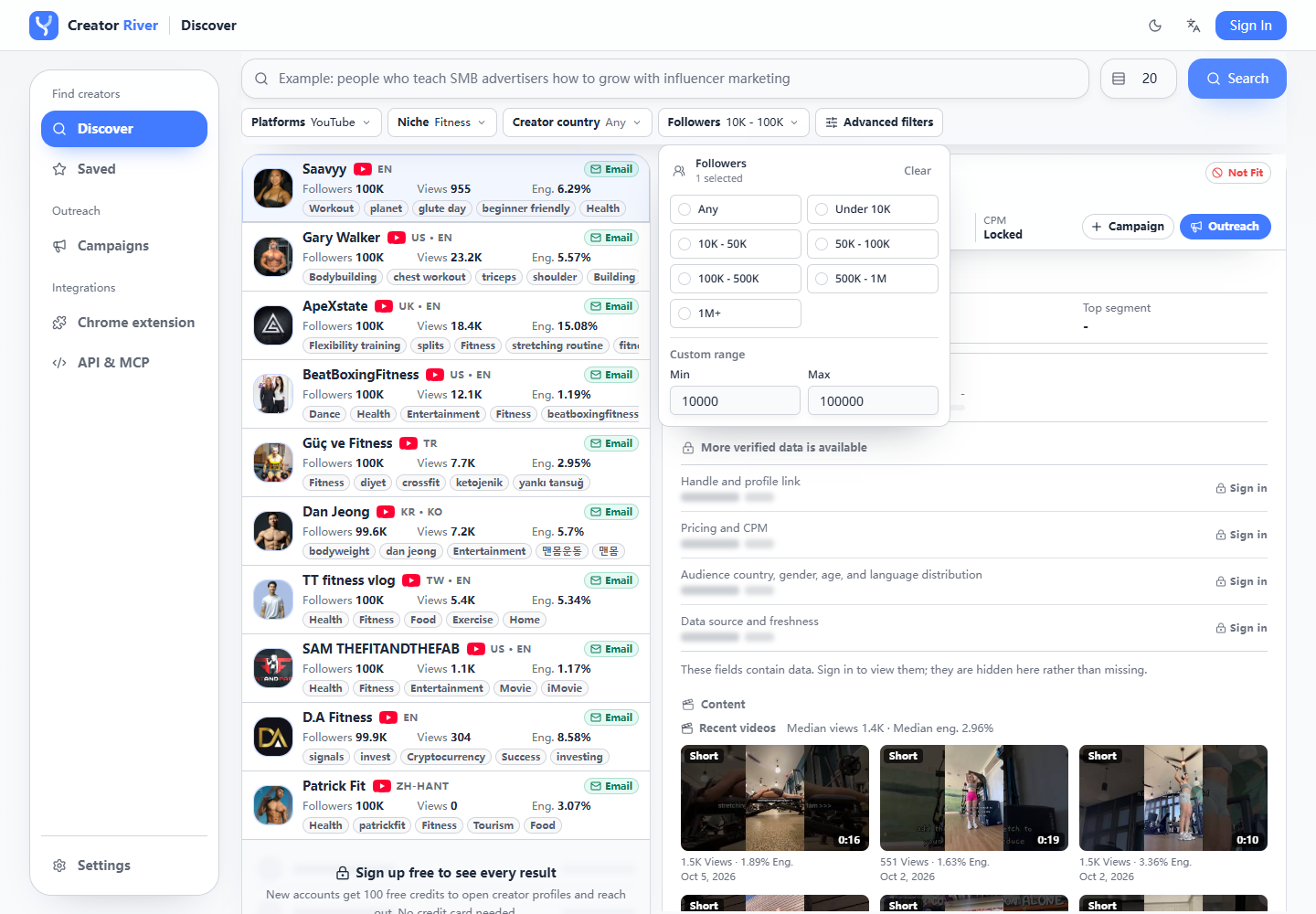
Live Discover controls, captured November 5, 2026. This example uses Fitness and a 10,000–100,000 band; choose criteria that suit your own brief.
For example, start with YouTube channels about beginner espresso equipment and a subscriber band your team chooses. Refine the topic if results drift into cafe operations. The brief guides the search; neither the subscriber band nor a result's position establishes budget fit.
Audience age, gender, ethnicity, income, authenticity scores, transcript search, and lookalike graphs are not part of this Creator River checklist. Check on YouTube, ask the creator, or evaluate a specialist suite when you need evidence beyond the available product data.
How to vet YouTube channels: views over vanity subscribers
Vet a YouTube channel on recent comparable performance, content fit, and viewer response. Treat subscribers as an account-size signal. They do not establish the audience that will watch your proposed sponsored video.
Compare typical recent views within each format
Review the last 8–12 uploads, separating long-form videos from Shorts. For a long-form integration, focus on recent long-form videos about comparable subjects. Record their views and publication dates. Comparing similarly aged uploads avoids judging yesterday's video against one that has accumulated views for months.
A median can keep one viral upload from defining expectations. Compare that typical reach with subscriber count to spot questions worth asking, without imposing a universal views-to-subscribers threshold. Small channels can have strong relevant reach; large channels can have uneven performance.
For a Shorts brief, repeat the exercise with Shorts. If the partnership includes both formats, keep two sets of observations. A combined average can hide the format difference your budget depends on.
Watch the content and read the discussion
- Comment quality: look for specific questions, relevant experiences, and useful creator replies. Generic comments deserve inspection, but cannot prove fraud.
- Niche consistency: check roughly the last 30–90 days. Confirm your topic is recurring rather than an isolated successful upload.
- Sponsored segments: watch at least one previous integration for tone, clarity, and disclosure habits. Would your product fit naturally into that explanation?
- Customer fit: consider language, use case, and buying context. Ask for a recent YouTube Studio audience screenshot when viewer geography matters.
A creator's location does not establish where viewers live. Public comments and production quality also cannot establish audience demographics. Keep unanswered questions visible until the creator supplies relevant evidence.
For smaller subscriber bands, use how to find micro influencers. For the wider review process, see the general guide's vetting checklist.
YouTube influencer database vs search tool vs marketplace
A YouTube influencer database is a searchable collection of channel profiles. A YouTube influencer search tool is the interface used to query and filter that collection. A “YouTube influencer finder” label alone does not tell you how contacts, analytics, or hiring work.
| Type | What you get | When it fits |
|---|---|---|
| YouTube Creator Partnerships | First-party creator discovery in Google Ads or DV360, with insights where shared | You already use Ads and its eligibility and coverage suit your brief |
| Marketplace hire, such as Collabstr | Opted-in creator offers and packages, with marketplace booking and payment terms | You want to compare listed offers and hire through that marketplace |
| Cold-email searchable database, such as Creator River | YouTube, TikTok, and Instagram search, profile access, published business emails, and campaign outreach | You want filters followed by direct email conversations |
| Full influencer-marketing suite, such as Modash or HypeAuditor | Wider audience analytics and program workflows, depending on the provider | You need deeper analysis or ongoing coordination tools |
| YouTube-only crawler, such as ChannelCrawler | YouTube-focused channel discovery and contact data | Your program needs a specialist YouTube research tool |
These are category examples, checked November 5, 2026 against Collabstr, Modash, HypeAuditor, and ChannelCrawler. Categories overlap, and features and terms vary. Compare the specific plan and workflow rather than treating all tools as interchangeable.
Creator River's database overview explains its search-to-email model. Try Discover with your own brief and review pricing before scaling contact access. A database listing does not mean the creator has agreed to a partnership.
How Creator River helps you find YouTube influencers
- Open Discover and select YouTube. Confirm the visible platform filter before comparing channels.
- Add your niche and subscriber band. Use plain-language search and follower minimums and maximums to make the criteria explicit.
- Open promising profiles, then verify on YouTube. Profile access uses credits. Every listed creator has a published business email on record; contact access also uses credits. Check recent videos before deciding whom to approach.
- Browse niche examples if useful. Try YouTube beauty creators, fitness creators, or US finance creators. These directories are starting examples; use Discover to apply your own brief.
- Add selected creators to a campaign. Send your pitch and track replies in its outreach list. Discuss availability and commercial terms with the creator.
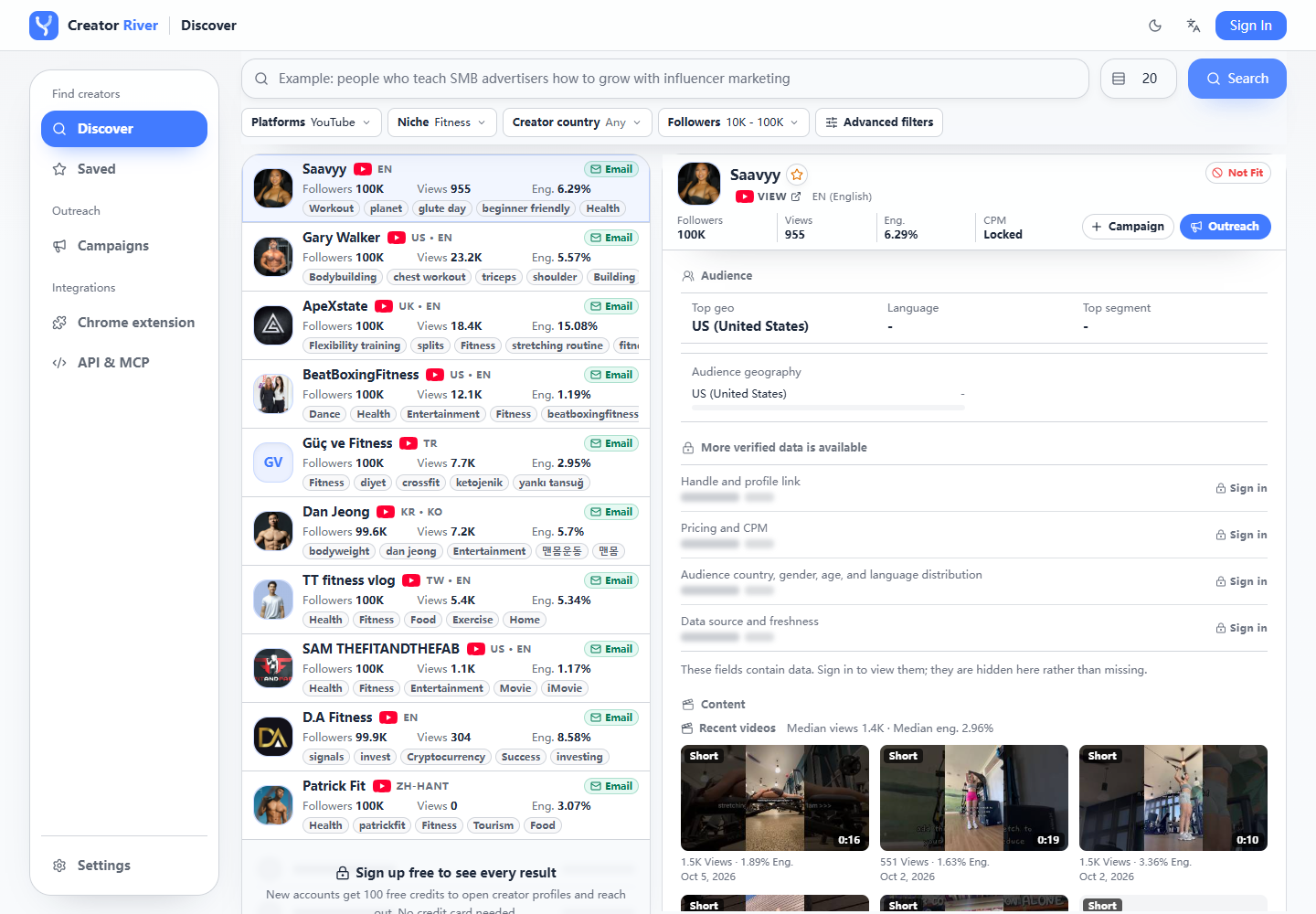
Live filtered results, captured November 5, 2026. Listings and metrics change; review each channel before deciding whether to contact it.
Credits cover access and sending
The live pricing page, checked November 5, 2026, lists Free at $0 with 100 signup credits, 150 searches a day, and 100 free outreach emails a day. Opening a creator costs 0.5 credits; reopening is free. Contact reveal costs 0.2 credits, refunded on bounce. Emails beyond the free daily allowance cost 0.1 credits each.
Starter's annual option is about $15.83 per month, billed as $190 yearly for 28,800 credits. Confirm current terms before choosing a plan. Credits buy access and sending capacity. Budget separately for creator fees, products, shipping, and content rights.
For agent workflows, Creator River MCP shares the same credits and limits as the web workflow.
After the shortlist
- First contact: use the influencer outreach guide, then campaigns to send and track replies.
- After an interested reply: follow how to collaborate with influencers for terms, briefing, and delivery.
- Broader discovery: use how to find influencers for your brand.
- Size-band decisions: see how to find micro influencers.
- Product model: review the influencer database.
FAQ
How do you find YouTube influencers?
Choose a niche, subscriber band, and format. Search YouTube for customer questions, competitor reviews, and disclosed sponsorships, then use a database or another tool when you need consistent filters. Vet recent views, format mix, and audience fit before contacting your shortlist.
How do you find influencers on YouTube for free?
Use YouTube search, the Channel filter, competitor review queries, and related-video recommendations. Inspect recent uploads manually. Creator River also offers free search within access limits; opening profiles and revealing contacts use credits.
What is a YouTube influencer database?
It is a searchable index of YouTube channel profiles, often with subscriber and topic filters and contact access. Some databases focus only on YouTube; others cover several platforms. Check coverage, contact availability, and access charges before choosing one.
What is a YouTube influencer search tool?
It is software for finding and filtering potential YouTube partners. Compare the filters you can actually use, available performance evidence, and the route to contact. Search results still need content and audience review before outreach.
Marketplace vs influencer database: which is better for YouTube?
Choose a marketplace when listed packages and in-platform booking suit your process. Choose a database when you want filtered discovery and direct email outreach. Compare software access, creator fees, and the work your team will handle under the same brief.
How does YouTube Creator Partnerships fit?
It is YouTube's first-party discovery and partnership route in Google Ads and DV360, formerly known as BrandConnect. It can suit advertisers already using those tools. Check Google's eligibility guidance for your account and region.
How do I vet Shorts-heavy vs long-form YouTubers?
Compare recent Shorts separately from recent long-form uploads. Use the format you intend to commission when judging typical views and content quality. A Shorts-heavy channel's combined metrics cannot establish likely reach for a longer sponsored review.
Does Creator River book YouTubers with escrow?
No. Creator River provides discovery, published business email access, outreach, and campaign conversations. Agree creator compensation, deliverables, rights, and payment arrangements separately. Product credits do not purchase a marketplace booking.
Is Creator River a YouTube-only database?
No. Creator River covers YouTube, TikTok, and Instagram. Select YouTube in Discover to focus this workflow on channels, then verify each creator's recent content and audience fit.
How much do Creator River credits cost vs creator fees?
Under the checked pricing, a profile open costs 0.5 credits and contact reveal costs 0.2 credits. Those charges buy product access. A creator's sponsorship fee depends on the deliverables and terms you agree separately.
Build your YouTube shortlist
Managing repeat channel partnerships? Use the influencer CRM guide to decide when campaign conversations need a broader relationship record.
Before negotiating an integration, use the influencer rate calculator method to compare scoped quotes and plan basic ROI tracking.
Open Discover and set platform to YouTube, add a niche and subscriber band, then review recent videos. Use the influencer database overview to understand the product and pricing to plan access before outreach.
Evaluating AI search? Use the AI influencer discovery buyer guide to check platform claims and the evidence behind your results.